How We Built QRORDER PRO: A Full-Stack QR Code Restaurant Ordering Platform
A deep dive into the architecture, design decisions, and tech stack behind QRORDER PRO — our end-to-end digital ordering solution built with React, TypeScript, Supabase, and Tailwind CSS.
Eric Sangcap
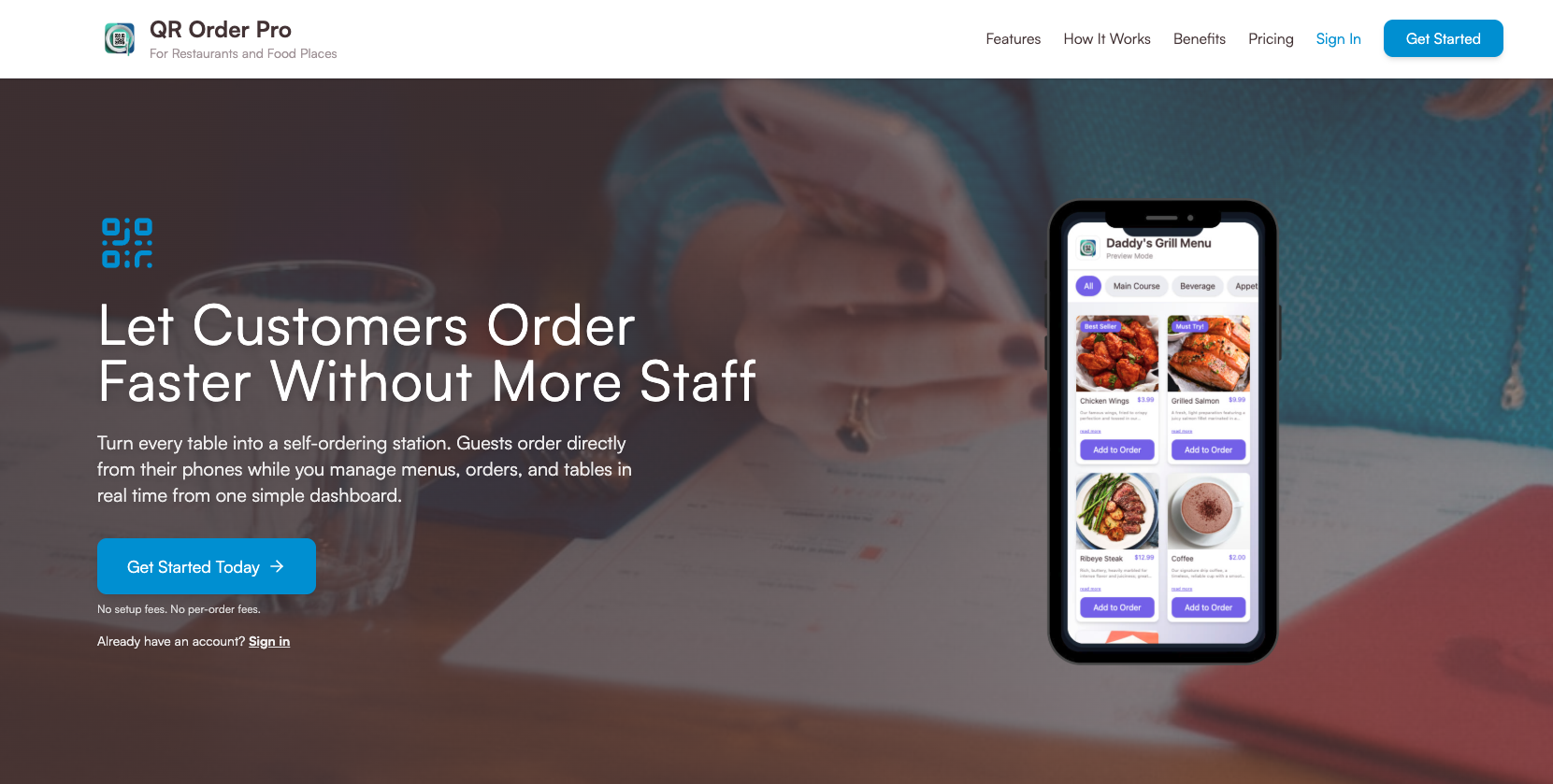
Live Project
qrorder.pro
Live Project
Check out QRORDER PRO in action
See the finished product we built from the ground up.
The Problem We Set Out to Solve
The restaurant industry was forever changed by the pandemic, but the solutions that emerged — clunky PDF menus, third-party ordering apps with massive commission fees, and half-baked digital tools — left a lot to be desired. Restaurant owners told us the same things: they wanted a branded, commission-free ordering system that was dead simple for customers and gave them full control over their menu, pricing, and operations. They didn't want to pay 15-30% per order to a marketplace platform. They wanted to own the customer relationship.
Key Points:
- Third-party platforms charging 15-30% commission per order
- PDF menus with no interactivity or real-time updates
- Customers forced to download apps they'd use once
- Staff bottlenecks during peak hours causing lost revenue
Choosing the Tech Stack
We needed a stack that was fast to develop with, performant at scale, and cost-effective to host. After evaluating multiple options, we landed on a modern JavaScript/TypeScript stack that gave us the best balance of developer experience, performance, and real-time capabilities. React with TypeScript gave us type safety and a component-driven architecture perfect for the complex UI states of a multi-role ordering platform. Tailwind CSS let us move fast on the design system without writing thousands of lines of custom CSS. And Supabase was the game-changer — giving us a PostgreSQL database, real-time subscriptions, Row Level Security, authentication, and edge functions all in one platform.
Key Points:
- React 18 + TypeScript for a type-safe, component-driven frontend
- Tailwind CSS for rapid, utility-first responsive UI development
- Supabase (PostgreSQL + Realtime + Auth + Edge Functions) as the entire backend
- React Router for client-side navigation across admin, kitchen, and customer views
Architecture: Three Apps in One
QRORDER PRO isn't a single interface — it's three distinct experiences unified under one codebase. The Customer View is what diners see after scanning a QR code: a beautiful, mobile-first menu where they can browse categories, view item details with high-res images, customize add-ons and special instructions, and place orders that go straight to the kitchen. The Admin Dashboard is where restaurant owners manage everything: menu items (with drag-and-drop reordering), categories, pricing, availability toggles, table management, QR code generation, order history, and real-time revenue analytics. The Kitchen Display System (KDS) is a real-time order queue that kitchen staff see on a mounted tablet or screen — new orders appear instantly via Supabase Realtime subscriptions, with status updates (new, preparing, ready, served) that sync across all connected devices.
Key Points:
- Customer View: Mobile-first menu browsing, cart management, and instant ordering
- Admin Dashboard: Full menu CRUD, table management, QR generation, and analytics
- Kitchen Display System: Real-time order queue with live status updates via WebSockets
- Shared component library and design tokens across all three interfaces
Real-Time Order Flow with Supabase
The real magic of QRORDER PRO is that it feels instant. When a customer places an order, it hits the Supabase database and the kitchen display updates in under 500ms — no polling, no page refreshes. We achieved this using Supabase's Realtime feature, which uses WebSocket connections to push database changes to all subscribed clients. We set up channel subscriptions on the orders table filtered by restaurant_id and status, so each kitchen only receives their own orders. Row Level Security policies ensure that customers can only create orders (not read others'), admins can manage their own restaurant's data, and kitchen staff can update order statuses. We also built Supabase Edge Functions for operations that needed server-side logic — like calculating order totals with tax, validating menu item availability before confirming an order, and sending order confirmation notifications.
Key Points:
- Supabase Realtime WebSocket subscriptions for <500ms order delivery to kitchen
- Row Level Security (RLS) policies for multi-tenant data isolation
- Edge Functions for server-side order validation and total calculation
- Optimistic UI updates on the customer side with rollback on failure
The QR Code System and Table Management
Each table in a restaurant gets a unique QR code that encodes the restaurant ID and table number into the URL. When scanned, the customer lands directly on that restaurant's menu with the table pre-selected — no manual input needed. We built a QR code generator directly into the admin dashboard using the qrcode.react library, letting owners generate, download, and print QR codes for all their tables in one click. The QR codes link to clean, branded URLs (e.g., /menu/restaurant-slug/table/5), and we implemented dynamic meta tags so the link preview shows the restaurant name and logo when shared. Table management in the admin panel shows real-time occupancy status — which tables have active orders, which are waiting for food, and which are available — giving managers a bird's-eye view of their floor.
Key Points:
- Dynamic QR codes encoding restaurant ID and table number into branded URLs
- Batch QR code generation and PDF export for easy printing
- Real-time table occupancy dashboard with order status indicators
- Automatic table session management — new scan starts a fresh session
Design Decisions: Mobile-First, Always
Since 95%+ of customer interactions happen on phones, we designed the entire customer experience mobile-first. The menu uses a sticky category navigation bar that scrolls horizontally, large touch-friendly cards with appetizing food photography, a persistent floating cart button showing item count and total, and a streamlined checkout flow that takes less than 30 seconds. For the admin dashboard and kitchen display, we optimized for tablet and desktop — these interfaces need more screen real estate for data tables, analytics charts, and the order queue. We used Tailwind's responsive breakpoint system extensively, and every component was built to adapt gracefully from 320px phones to 1920px desktop monitors. The color system, typography, and spacing all use CSS custom properties defined in a central design token file, making it trivial for restaurant owners to customize the look to match their brand.
Key Points:
- Sticky horizontal category nav with smooth scroll-snap for mobile menu browsing
- Floating cart button with animated badge — always accessible, never intrusive
- Checkout flow optimized to under 30 seconds from cart to order confirmation
- Centralized design tokens for easy restaurant-specific brand customization
Challenges We Faced (and How We Solved Them)
Building QRORDER PRO wasn't without its headaches. The biggest challenge was handling offline and flaky connections — restaurants don't always have perfect WiFi, and a customer losing their order mid-checkout is unacceptable. We implemented a service worker caching strategy for the menu data so the browsing experience works offline, and used IndexedDB to persist cart state locally. When connectivity returns, pending orders sync automatically. Another major challenge was image optimization. Restaurant menus are image-heavy, and loading 50+ high-res food photos on a 3G connection would kill the experience. We built a lazy-loading image pipeline with Supabase Storage that serves responsive images via CDN with automatic WebP conversion and blur-up placeholders. Performance went from a 6-second initial load to under 2 seconds.
Key Points:
- Service worker + IndexedDB for offline menu browsing and cart persistence
- Automatic order sync when connectivity is restored
- Responsive image pipeline with CDN, WebP conversion, and blur-up placeholders
- Menu data prefetching and caching strategy reducing repeat load times to <500ms
Results and What's Next
QRORDER PRO is now live and serving real restaurants. The feedback from both owners and diners has been overwhelmingly positive. Restaurants using QRORDER PRO have reported a 40% reduction in order-taking time during peak hours, a 25% increase in average order value (because customers browse the full menu with images instead of rushing through a paper menu), and near-zero order errors since everything is digital and goes straight to the kitchen. Looking ahead, we're building payment integration (Stripe and local payment gateways), multi-language support for tourist-heavy areas, AI-powered menu recommendations based on popular items and time of day, and a loyalty/rewards system. The foundation we built with React, TypeScript, Supabase, and Tailwind CSS makes all of this extensible without rewriting the core platform.
Key Points:
- 40% reduction in order-taking time during peak hours
- 25% increase in average order value thanks to visual menu browsing
- Near-zero order errors with digital kitchen-direct ordering
- Upcoming: Stripe payments, multi-language, AI recommendations, and loyalty programs
Conclusion
Building QRORDER PRO taught us that the best software doesn't just solve a technical problem — it solves a human one. Restaurant staff shouldn't have to choose between speed and accuracy. Diners shouldn't have to wait 10 minutes just to place an order. And restaurant owners shouldn't have to surrender 30% of their revenue to a third-party platform. Our tech stack — React, TypeScript, Tailwind CSS, and Supabase — gave us the tools to build something fast, reliable, and beautiful. But it was the deep understanding of how restaurants actually operate that made QRORDER PRO more than just another ordering app. If you're a restaurant owner looking to modernize your ordering experience, or a business with a similar workflow challenge, we'd love to talk. At ES Web Solutions, we build software that works in the real world.
Visit QRORDER PRORelated Articles
Continue your learning journey